Your suppliers changed their prices.
Now what?

You open the Harken spreadsheet. Reapply the formulas. Is this formula right? Get the numbers almost right — then realize you have to go back three steps. The markup is too high on some products, too low on others. What did I do the last time? You can't find where the current data came from. Start over. Get through it again — wait, does this include tariffs? You don't know which end is up anymore. And you have four more suppliers to do this weekend.

Your suppliers. Their file formats. Your problem — until now.

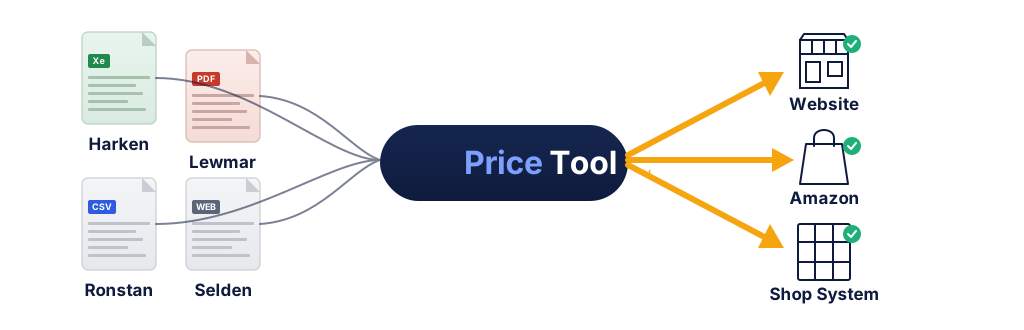
Supplier files flow into PriceTool.io, then output to your website, Amazon, and shop system

PriceTool.io takes the formulas, the reformatting, and the guesswork off your plate.

Your supplier files go in. Correct prices come out — with:

Your markups applied
Your MAP floors enforced
Your landed costs calculated

Every product. Every platform. No spreadsheet required.

Every supplier sends a different file. You maintain a template for each one.

Harken sends an Excel file with columns in one order. Lewmar sends a completely different layout. Ronstan uses a third format. Selden, Facnor, Sta-Lok, Wichard — each one different. You maintain a spreadsheet template for every supplier just to normalize the data before you can even start repricing.

And then January hits. Five suppliers drop new price lists in the same week. That is 10,000 products to reprice, and every file has to be reformatted by hand first.

You did not start a marine retail business to spend your weekends in Excel.

PriceTool.io reads your suppliers' formats natively. Upload the file. Get standardized, repriced data without touching a spreadsheet. No templates. No reformatting. No weekends lost.

See supported suppliers
Format Convergence Graphic — NotebookLM Infographic Prompt PROMPT: Create a vertical or square-format infographic showing data convergence. At the TOP, show 6–8 small document icons arranged in a scattered pattern, each representing a different supplier file format. Each document should have a visible but DIFFERENT column layout inside it (some with 4 columns, some with 7, some with different header positions). Label each document with a real supplier name: "Harken", "Lewmar", "Ronstan", "Selden", "Facnor", "Wichard", "Sta-Lok". Use slightly different accent colors for each document (variations of slate and blue). All documents feed downward through a single funnel or convergence point colored in blue (#2563eb) labeled "PriceTool". Below the funnel, a single clean data table emerges with perfectly uniform columns: "MPN | Description | Cost | MSRP | MAP | Sell Price" — all rows aligned, consistent, with green (#16a34a) status indicators. The visual story: many chaotic inputs become one standardized output. Background: light gray (#f8fafc). Flat vector style, no 3D, no gradients.
Timeline Illustration — NotebookLM Infographic Prompt PROMPT: Create a wide-format (16:9) split-screen comparison infographic divided vertically into two halves. LEFT HALF (labeled "Without PriceTool" in slate #475569): A horizontal timeline from January to March. In January, a document icon labeled "Ronstan Price Update" arrives. February is empty (no action taken). In March, a red (#dc2626) alert burst shows "Negative Margin — 200 products sold below cost for 2 months" with a downward-pointing dollar sign or loss indicator. The mood of this side is muted, using slate and red tones. RIGHT HALF (labeled "With PriceTool" in blue #2563eb): The same timeline. In January, the same document arrives, immediately followed by a blue (#2563eb) processing icon and a green (#16a34a) checkmark labeled "Prices updated — same day." February and March show calm, steady green status bars — no alerts, no problems. The contrast should be stark: chaos and loss on the left, control and protection on the right. Use a thin vertical divider line between the halves. Background: white. Flat vector style matching the Hero Visual.

Ronstan raised costs in January. You found out in March.

Two months of selling 200 products at negative margin. That is money you already lost and will never recover. It happens because updating prices manually is so painful that it falls behind — and there is no alert when supplier costs change.

Or worse: a MAP violation notice from Lewmar because one price on Amazon dipped below the floor. One spreadsheet mistake and you are explaining yourself to keep your authorized dealer status.

PriceTool.io recalculates every downstream price the moment a new supplier file is processed. MAP floors and MSRP ceilings are enforced automatically on every product, every platform, every time. Prices physically cannot go below MAP.

How MAP enforcement works

You updated your website. Did you update Amazon too?

If you sell on your website and Amazon — or your website, Amazon, and eBay — you already know the anxiety. You update one platform and forget the other. Or you update both but with slightly different prices because the spreadsheets got out of sync.

Three of the five largest marine retailers we studied have zero marketplace presence. Not because they do not want to sell on Amazon — because the pricing complexity is too hard to manage manually at scale.

PriceTool.io manages per-platform pricing from a single master catalog. Different markups for your website versus Amazon versus eBay, all calculated from one source of truth. When a supplier cost changes, every platform updates simultaneously.

Multi-platform pricing details
Multi-Channel Diagram — NotebookLM Infographic Prompt PROMPT: Create a square-format infographic showing a hub-and-spoke pricing architecture. In the CENTER, a rounded rectangle labeled "PriceTool Master Catalog" in navy (#0f1d35) with white text, containing a small data table icon. Three arrows radiate outward from this center box to three CHANNEL CARDS arranged around it (right side or bottom). Each channel card is a rounded rectangle showing: CHANNEL 1 — labeled "Your Website" with a storefront icon, showing "Harken 57mm Carbo Block — $49.95" with a "15% markup" note in small text. CHANNEL 2 — labeled "Amazon" with a generic marketplace icon (NOT the Amazon logo — use a simple shopping bag icon), showing the same product at "$52.99" with "22% markup". CHANNEL 3 — labeled "eBay" with a generic auction/marketplace icon, showing "$51.95" with "20% markup". The KEY VISUAL POINT: same product, three different prices, all flowing from one source. Each arrow should be colored in teal (#0d9488). The center box should feel solid and anchoring. Channel cards should have light backgrounds (#f8fafc) with colored left borders matching each channel. Flat vector style, clean labels, no logos of real companies.

Generic tools were not built for your business.

Enterprise PIM systems cost six figures and take months to configure. Shopify apps handle pricing for t-shirts, not for Robline rope sold by the foot from 600-foot spools. Generic import tools do not know that Harken enforces MAP at 20% off MSRP, or that a Sta-Lok terminal and a Selden furler need completely different pricing models.

PriceTool.io was built from the ground up for marine equipment retail. It knows your suppliers, your pricing structures, your platforms, and your workflow.

UOM Packaging Variants

Buy a 600-foot spool, automatically create 50-foot and 100-foot listings with correctly calculated per-unit pricing.

🔑

Three-Tier Customization

Your descriptions and overrides persist through every supplier update — never overwritten, no matter how many times the supplier sends a new file.

📈

Three Pricing Models

Standard wholesale markup, percent-off-MSRP, percent-off-list — because different suppliers require different approaches.

Comparison Illustration — NotebookLM Infographic Prompt PROMPT: Create a wide-format (16:9) side-by-side comparison infographic. LEFT SIDE (labeled "Generic PIM / ERP"): A dense, cluttered interface mockup with dozens of tiny form fields, tabs, dropdown menus, and irrelevant sections like "Warehouse Zone", "Lot Tracking", "Multi-Currency Matrix" — all in muted grays. A small red price tag is buried among the noise. The overall feel is overwhelming and enterprise-heavy. A cost label "$$$$$" and a clock showing "6+ months to configure" appear below it. RIGHT SIDE (labeled "PriceTool"): A clean, focused view showing one specific workflow — a Robline rope product card. At the top: "Robline Dinghy Control — 600 ft spool, $480 wholesale." Below it, three variant cards branch out: "50 ft cut — $52.95", "100 ft cut — $99.95", "Per-foot — $1.09" — each with a green checkmark. The feel is minimal, purposeful, and fast. Below: "No reformatting. Built for marine retail." Use blue (#2563eb) accents on the PriceTool side, flat slate (#475569) on the generic side. Strong visual contrast between overbuilt complexity and purpose-built simplicity. Flat vector, no 3D, no gradients.

The numbers behind the product.

Since PriceTool.io does not yet have customer testimonials, these specifics speak for themselves.

40+
Hours of manual work eliminated per supplier update
0
Spreadsheet templates you need to maintain
100%
MAP and MSRP compliance — every product, every platform
694
Automated tests backing the pricing engine

Additional capabilities: 3 pricing models  •  6 rounding rule options  •  Full version control  •  Mass discontinuation protection

Supported suppliers

Alexander Roberts
Andersen
CDI
Facnor
Harken
Johnson
Lewmar
NER
Peguet
ProFurl
Robline
Ronstan
Schaefer
Selden
Sta-Lok
Suncor
Tylaska
Wichard
Supplier Logo Strip — NotebookLM Infographic Prompt PROMPT: Create a wide-format (16:3 banner ratio) infographic showing a horizontal grid of supplier brand tiles. Arrange the tiles in a single row or two staggered rows. Each tile is a small rounded rectangle with a light background (#f8fafc) and a subtle border (#e2e8f0) containing the supplier name in bold navy (#0f1d35) sans-serif text. Supplier names to include: Harken, Lewmar, Ronstan, Selden, Wichard, Sta-Lok, Facnor, Robline, Tylaska, Schaefer, Suncor, Peguet, ProFurl, CDI, Johnson, Andersen, NER, Alexander Roberts. The four most recognized brands (Harken, Lewmar, Ronstan, Selden) should be slightly larger or have a blue (#2563eb) left border accent to draw the eye. At the far right end of the row, include one final tile with a "+" icon and the text "Growing" in teal (#0d9488) — implying more suppliers being added. Overall feel: clean, organized, credible. The density of names itself IS the trust signal. Background: transparent or navy (#0f1d35) to sit on the dark stats section. If on dark background, invert tile colors to white tiles with navy text. Flat style, no logos (text-only tiles), no decorative elements.

Platform exports expanding in 2026.

PriceTool.io currently generates upload-ready files for ASPDNSF (AspDotNetStorefront). Direct export support for these platforms is in active development:

Shopify

CSV and GraphQL API export

BigCommerce

CSV export with existing live store validation

Amazon

SP-API JSON feed format

eBay

Seller Hub CSV and Inventory API

Magento / Adobe Commerce

CSV export (three profiles)

WooCommerce

CSV and REST API export

Note: PriceTool.io's core pricing engine — the part that reads supplier files, calculates prices, and enforces MAP/MSRP — works today regardless of your sales platform. Platform export files determine the format of the output; the pricing automation is already production-ready. Research is complete for all six platforms. Implementation is underway.

Stop losing weekends to spreadsheets.

If you manage pricing for 2,000 products from 5 suppliers, or 10,000 SKUs from 40 suppliers across 3 platforms, the math is the same: manual pricing does not scale. It costs you time, margin, and marketplace revenue you are leaving on the table.

See PriceTool.io work with your actual supplier files. We will process one of your files live so you can see exactly what the output looks like for your catalog.

Request a Demo

No credit card. No commitment. Bring a supplier file and we will show you the before and after.